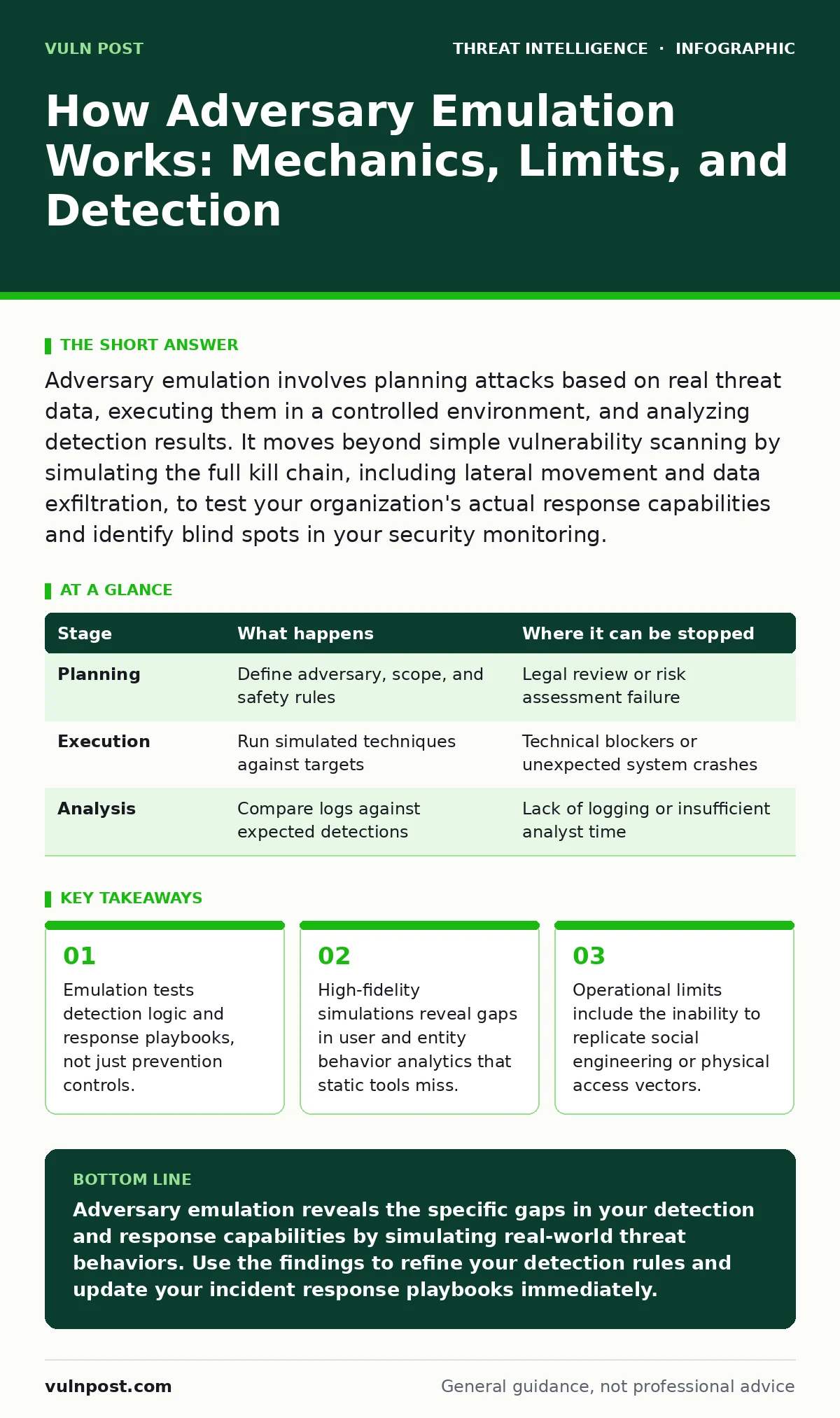
Adversary emulation involves planning attacks based on real threat data, executing them in a controlled environment, and analyzing detection results. It moves beyond simple vulnerability scanning by simulating the full kill chain, including lateral movement and data exfiltration, to test your organization's actual response capabilities and identify blind spots in your security monitoring.
The Foundation of Threat Simulation
Adversary emulation differs fundamentally from traditional penetration testing or vulnerability scanning. Vulnerability scanning identifies known weaknesses in software configurations. Penetration testing attempts to breach defenses using any available method. Adversary emulation replicates the specific tactics, techniques, and procedures of a known threat actor. You select a specific adversary profile based on your industry risk. You then execute their playbook against your environment. This approach tests whether your security operations center can detect and respond to a relevant threat. It shifts the focus from "can we be hacked" to "can we see them."
The process relies on open standards to ensure consistency and repeatability. Teams map simulation activities to the MITRE ATT&CK Navigator framework. This matrix categorizes adversary behaviors into tactical stages. By aligning tests with these categories, you create a structured evaluation of your defensive posture. You measure coverage across initial access, execution, persistence, and exfiltration. This structure allows you to compare results over time. It also helps you prioritize remediation efforts based on the likelihood of real-world usage.
Stage 1: Scenario Planning and Hypothesis Formulation
The first stage involves defining the scope and the adversary persona. You select a threat group whose methods align with your business risks. For example, a financial institution might focus on nation-state cyber attacks targeting data integrity. A healthcare provider might prioritize ransomware operators targeting patient records.
You define the hypothesis: "Our current controls will detect this adversary during the lateral movement phase." You also define the rules of engagement. These rules prevent accidental disruption of production systems. You identify critical assets that must remain online. You establish communication channels for immediate stop commands. This planning ensures the test remains safe and relevant.
You must also consider the baseline behavior of your environment. Normal network traffic varies by time of day and user activity. If you simulate attacks during peak hours, you risk generating noise that masks your test signals. You schedule the emulation during periods of typical activity to ensure realistic baseline comparisons. You document the expected outcomes for each technique. This documentation serves as the truth set for later analysis. Without clear expectations, you cannot accurately measure detection efficacy.
| Stage | What happens | Where it can be stopped |
|---|---|---|
| Planning | Define adversary, scope, and safety rules | Legal review or risk assessment failure |
| Execution | Run simulated techniques against targets | Technical blockers or unexpected system crashes |
| Analysis | Compare logs against expected detections | Lack of logging or insufficient analyst time |
Stage 2: Environment Preparation and Baseline Capture
Before any simulation begins, you capture the state of your environment. You verify that logging is enabled on all relevant endpoints and network devices. You ensure that security information and event management systems are receiving data. You check for alert fatigue conditions that might cause analysts to ignore legitimate signals. You disable automated containment actions that could disrupt the test. You want to see the full chain of events, not an automated block. You also verify that user and entity behavior analytics baselines are stable. If the system is still learning normal behavior, it will flag the simulation as an anomaly for the wrong reasons.
You prepare the test accounts and systems. You create dedicated user accounts for the simulation. These accounts have permissions similar to real users but are isolated from critical data. You install any necessary tools on these accounts. You verify that the tools can communicate with command and control infrastructure if the scenario requires it. You also ensure that forensic imaging capabilities are available. If a system behaves unexpectedly, you need to preserve evidence. This preparation minimizes the risk of data loss or system instability during the test.
Stage 3: Execution of Simulated Techniques
The execution phase involves running the selected techniques in sequence. You start with initial access methods, such as exploiting a known vulnerability or using stolen credentials. You then move to execution, where the adversary runs code on the target system. You simulate persistence mechanisms, such as creating scheduled tasks or modifying registry keys. You then attempt privilege escalation attacks to gain higher access rights. Each step is logged and timestamped. You monitor the environment for any signs of detection. You also monitor for any unintended side effects, such as service disruptions.
This phase requires careful pacing. You do not rush through the techniques. You allow time for logs to propagate to central systems. You allow time for analysts to review alerts. You may pause between stages to observe the response. This pacing mimics real adversary behavior, which often includes dwell time between actions. You document every action taken and every result observed. If a technique fails, you note the reason. Did a firewall block it? Did an endpoint detection platform quarantine it? This data is critical for the analysis phase.
Stage 4: Detection and Response Analysis
The final stage involves analyzing the results against the hypothesis. You review the logs and alerts generated during the execution phase. You determine which techniques were detected and which were missed. You evaluate the quality of the alerts. Was the alert actionable? Did it provide enough context for an analyst to investigate? You also evaluate the response time. How long did it take for the security team to acknowledge the alert? Did they follow the correct playbook? You compare these results to the expected outcomes defined in the planning phase.
You identify gaps in your detection logic. If a technique was not detected, you determine why. Was there no rule for it? Was the rule too noisy? Was the log source missing? You also identify gaps in your response capabilities. Did the team have the right tools to investigate? Did they have the authority to contain the threat? You document these findings and create remediation tasks. You prioritize these tasks based on the severity of the gap and the likelihood of real-world exploitation.
See also: Sigma Rules: Fix 6 Common Misunderstandings in Detection Logic · Detection Use Cases: Turning Raw Telemetry into Actionable Security Signals
Limits and Operational Realities
Adversary emulation has inherent limitations. It cannot test human factors. You cannot simulate social engineering attacks against real employees without risking actual compromise. You cannot test physical security breaches. You also cannot simulate the full scale of a coordinated attack. Emulation typically focuses on specific techniques rather than the entire campaign. This means you may miss gaps in correlation logic that only appear under high-volume attacks.
Another limit is the fidelity of the simulation. Tools may not perfectly replicate adversary behavior. They may leave artifacts that real adversaries would avoid. This can lead to false positives in your detection rules. You must validate that your rules detect the behavior, not the tool. You also face the risk of detection bias. Analysts may know the test is happening, which can improve their performance artificially. To mitigate this, you can run blind tests where only a subset of the team knows about the simulation.
Integrating with Broader Security Programs
Adversary emulation works best when integrated with other security practices. You should use the results to refine your detection use cases. You should update your incident response playbooks based on the observed gaps. You should also share the findings with development teams to improve secure coding practices. This creates a feedback loop that continuously improves your security posture.
You should also consider the long-term value of emulation. It is not a one-time exercise. You should run it regularly to track progress. You should also vary the adversary profiles to test different aspects of your defenses. This ensures that you are not just optimizing for a single threat. You are building a resilient security program that can adapt to evolving threats. By combining emulation with continuous monitoring and threat intelligence, you create a comprehensive defense strategy.
Key takeaways
- Emulation tests detection logic and response playbooks, not just prevention controls.
- High-fidelity simulations reveal gaps in user and entity behavior analytics that static tools miss.
- Operational limits include the inability to replicate social engineering or physical access vectors.
Adversary emulation reveals the specific gaps in your detection and response capabilities by simulating real-world threat behaviors. Use the findings to refine your detection rules and update your incident response playbooks immediately.
Frequently asked questions
How often should we run adversary emulation?
Run adversary emulation quarterly or after significant changes to your environment. Regular testing ensures that new vulnerabilities or misconfigurations are identified promptly.
Can we use automated tools for emulation?
Yes, automated tools can execute techniques consistently. However, manual analysis is still required to interpret the results and identify subtle detection gaps that tools might miss.
How this guide was produced: written by the Vuln Post editorial team with AI assistance, checked against the public references listed below, and reviewed when the facts change. See our editorial policy or report an error.