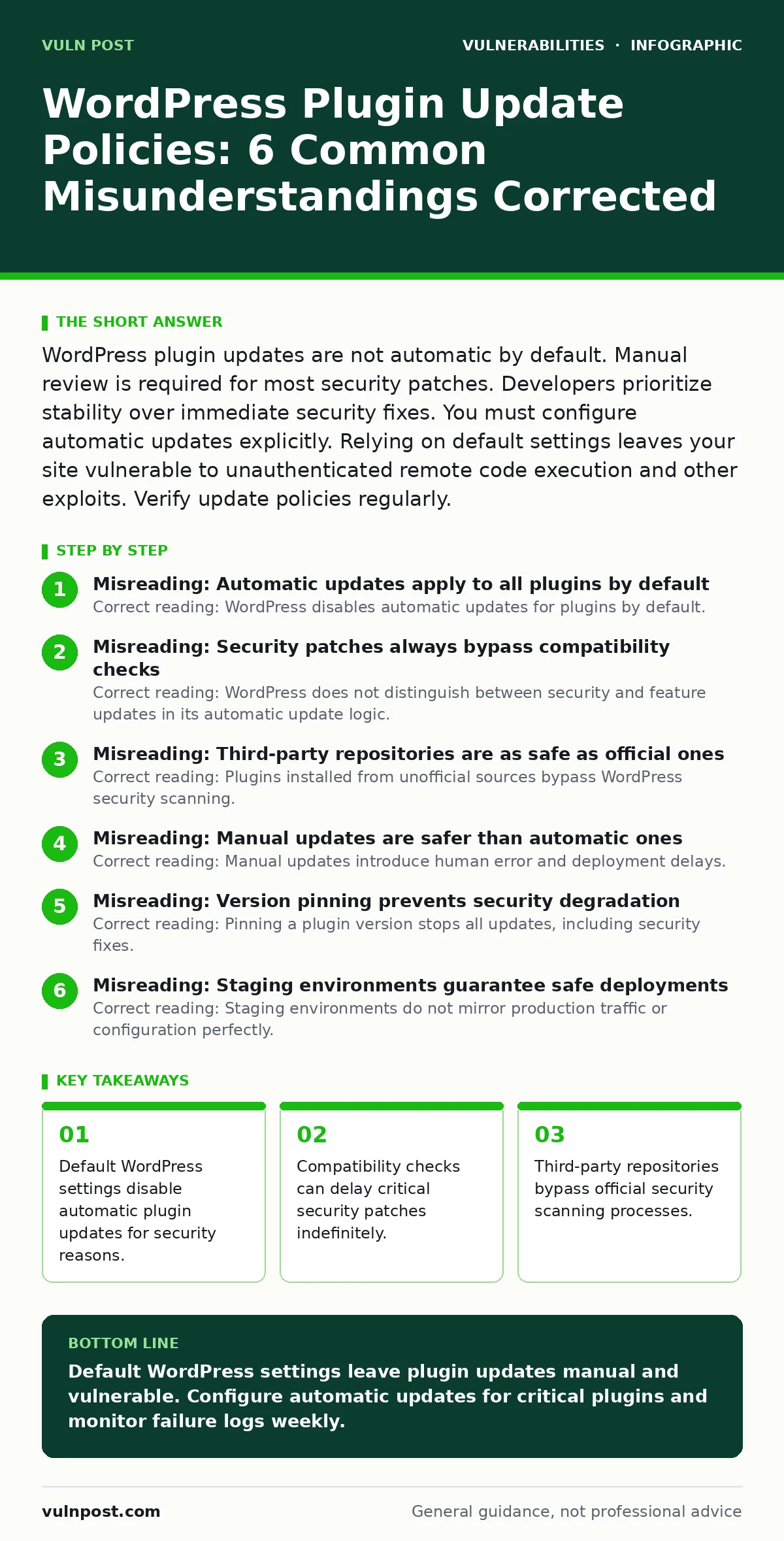
WordPress plugin updates are not automatic by default. Manual review is required for most security patches. Developers prioritize stability over immediate security fixes. You must configure automatic updates explicitly. Relying on default settings leaves your site vulnerable to unauthenticated remote code execution and other exploits. Verify update policies regularly.
Misreading: Automatic updates apply to all plugins by default
Correct reading: WordPress disables automatic updates for plugins by default. The core system updates automatically, but plugins require explicit configuration. This design prevents broken sites from incompatible code changes. You must enable automatic updates individually or via network settings. Assuming automatic coverage leads to missed security patches.
Plugins often introduce breaking changes that require manual verification. Leaving this setting at default exposes your site to known vulnerabilities. You remain responsible for applying every security fix. The platform assumes you will manage plugin stability yourself. This separation exists to protect site functionality.
Misreading: Security patches always bypass compatibility checks
Correct reading: WordPress does not distinguish between security and feature updates in its automatic update logic. A plugin marked as a security fix may still fail compatibility tests. If the update conflicts with your theme or other plugins, it is skipped. The system prioritizes site uptime over immediate security remediation.
You receive an email notification that the update failed. Many administrators ignore these failure notifications. The vulnerability remains open until you manually intervene. This mechanism protects against site breakage but delays security hardening. You must monitor update failure logs actively. Ignoring failed updates leaves your infrastructure exposed.
Misreading: Third-party repositories are as safe as official ones
Correct reading: Plugins installed from unofficial sources bypass WordPress security scanning. The official repository runs automated checks for malicious code. Third-party marketplaces often lack these rigorous standards. You assume the vendor performs adequate security review. Many vendors prioritize feature delivery over code hygiene.
Malicious code can hide within legitimate functionality. Supply chain attacks often originate from compromised third-party packages. You cannot verify the integrity of code from unvetted sources. Using unofficial plugins increases the attack surface significantly. You lose the safety net of platform-level validation. Stick to verified sources to reduce risk.
Misreading: Manual updates are safer than automatic ones
Correct reading: Manual updates introduce human error and deployment delays. Automatic updates apply patches immediately upon release. Manual processes require an administrator to notice, download, and apply the fix. This window can span days or weeks. Attackers exploit known vulnerabilities rapidly. The delay between patch release and manual application is the critical risk. You create a predictable timeline for attackers. Automation reduces the mean time to remediation. Manual checks are useful for testing compatibility. They are not a security strategy. Relying solely on manual updates increases exposure time. Balance control with speed.
Misreading: Version pinning prevents security degradation
Correct reading: Pinning a plugin version stops all updates, including security fixes. You lock the software at a specific point in time. Vulnerabilities discovered after that point remain unpatched. The code becomes a permanent liability. You may disable updates to prevent breaking changes. This trade-off favors stability over security. Over time, pinned versions become unsupported. The developer stops providing patches. You are left maintaining legacy code yourself. This approach fails when zero-day vulnerabilities emerge. You cannot patch a version that receives no updates. Version pinning is a short-term fix, not a strategy.
See also: Why CVE Identifiers Matter for Security Operations
Misreading: Staging environments guarantee safe deployments
Correct reading: Staging environments do not mirror production traffic or configuration perfectly. A plugin may work in staging but fail in production. Differences in server resources, database size, or user behavior cause hidden errors. Security configurations often differ between environments. A patch may introduce a new vulnerability in production. You assume staging tests are sufficient. They often miss edge cases. Automated testing tools help but do not replace manual review. You must validate updates in production-safe ways. Blue-green deployments reduce risk further. Staging is a helpful step, not a guarantee.
Misreading: Plugin developers prioritize security over features
Correct reading: Most plugin developers balance security with functionality and revenue. Security patches may break existing features. Developers test for compatibility before releasing updates. This process takes time. You expect immediate security fixes. Developers often release minor versions first. Major security fixes may wait for stable releases. You must monitor developer changelogs. Do not assume every update contains a security fix. Some updates are purely cosmetic. You need to verify the nature of each update. Subscribe to security advisories for critical plugins. Do not rely on update frequency alone.
Misreading: Input validation is handled by the platform
Correct reading: WordPress provides basic input validation, but plugins handle their own data. Poorly coded plugins bypass platform safeguards. You assume the core system protects against cross-site scripting (XSS). Plugins often process user input directly. Weak validation allows malicious scripts to execute. You must verify plugin security practices. Check for sanitization and escaping functions. Many plugins fail these checks. Input validation errors are common in third-party code. You cannot rely on the platform alone. Audit plugin code for security flaws. Use security scanning tools to detect issues.
Misreading: Session management is secure by default
Correct reading: WordPress manages sessions, but plugins can weaken security. Plugins may store sensitive data insecurely. Session fixation attacks exploit weak session handling. You assume the platform secures user sessions. Plugins often introduce custom authentication flows. These flows may lack proper security controls. You must review plugin session management. Look for secure cookie settings. Verify that sessions expire correctly. Weak session handling leads to account takeover. You cannot trust default plugin settings. Configure session security explicitly. Monitor for suspicious login activity.
Key takeaways
- Default WordPress settings disable automatic plugin updates for security reasons.
- Compatibility checks can delay critical security patches indefinitely.
- Third-party repositories bypass official security scanning processes.
- Manual updates require consistent administrative attention to remain effective.
Default WordPress settings leave plugin updates manual and vulnerable. Configure automatic updates for critical plugins and monitor failure logs weekly.
Frequently asked questions
How do I enable automatic updates for all plugins?
Use the WordPress admin dashboard to enable automatic updates for each plugin individually. Network admins can enable them site-wide. Third-party plugins can automate this process.
What happens if a plugin update fails?
WordPress skips the update and sends an email notification. The plugin remains at its current version. You must manually resolve the compatibility issue.
Can I force a plugin update via command line?
Yes, using WP-CLI you can force updates. This bypasses compatibility checks. Use this only in emergency security situations.
How do I check for plugin vulnerabilities?
Use security scanning tools that analyze plugin code. Subscribe to security advisories from developers. Monitor official WordPress security pages.
How this guide was produced: written by the Vuln Post editorial team with AI assistance, checked against the public references listed below, and reviewed when the facts change. See our editorial policy or report an error.