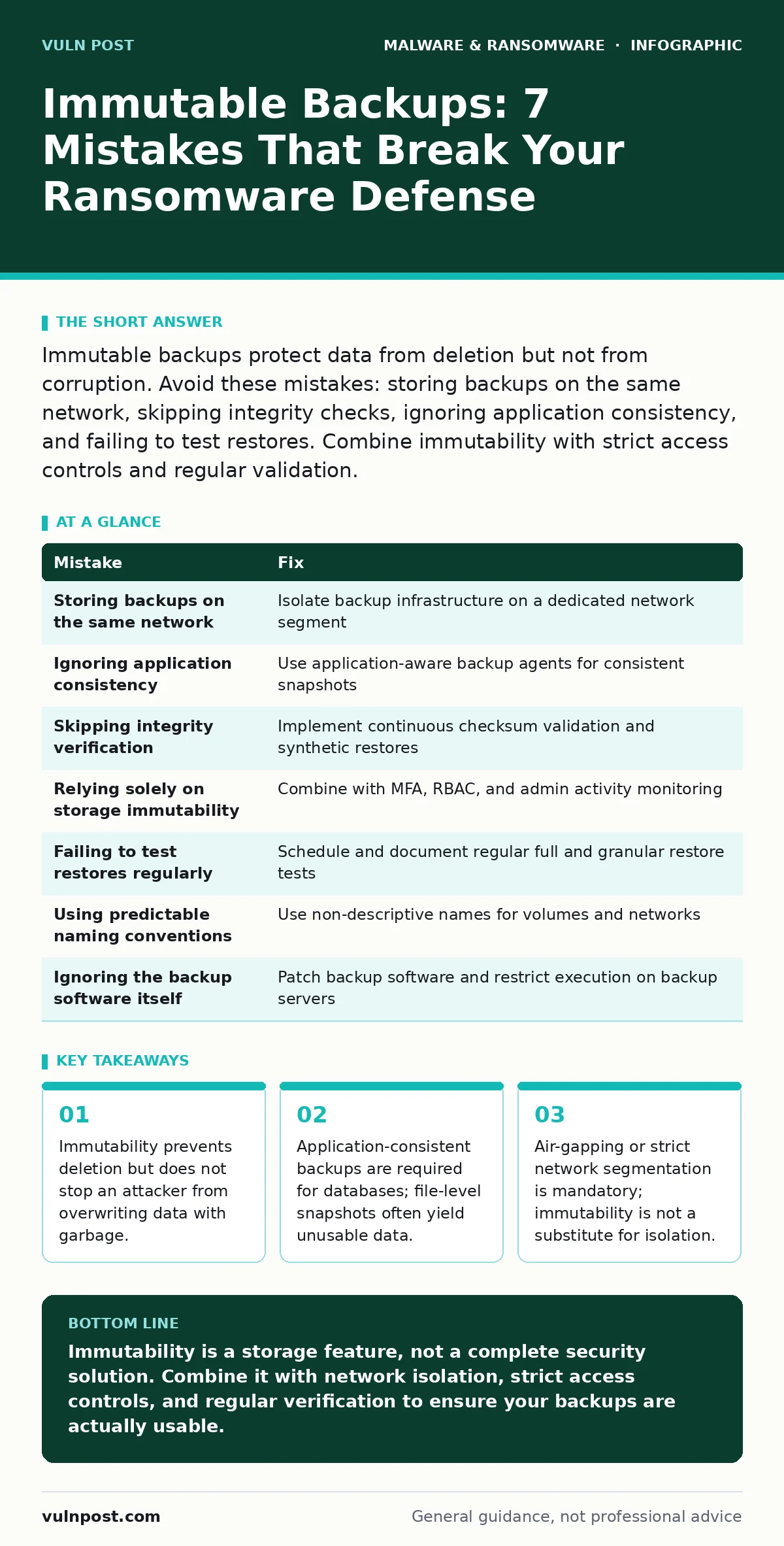
Immutable backups protect data from deletion but not from corruption. Avoid these mistakes: storing backups on the same network, skipping integrity checks, ignoring application consistency, and failing to test restores. Combine immutability with strict access controls and regular validation.
Mistake 1: Storing Backups on the Same Network Segment
Many organizations place backup repositories on the same VLAN or subnet as production servers. This assumes that storage immutability is a sufficient barrier against lateral movement. It is not. If an attacker compromises a production server, they can often reach the backup storage directly to inject malicious data or corrupt files before the immutability lock engages.
Why it hurts:
Immutability prevents deletion or modification of existing blocks for a set period. It does not prevent new data from being written. An attacker can overwrite your clean backup with corrupted data or ransomware-encrypted files. Once the lock expires, you have no clean state to revert to. The backup system happily preserves the malicious version because it sees it as a legitimate write operation.
The fix:
Isolate backup infrastructure on a dedicated network segment with no inbound traffic from production environments. Use a dedicated management interface for configuration. Implement strict firewall rules that allow only authenticated backup agents to push data to the repository. This segmentation ensures that even if production is compromised, the attacker cannot reach the backup storage to inject bad data.
Mistake 2: Ignoring Application Consistency
File-level backups often capture files while applications are actively writing to them. This results in inconsistent states where transaction logs do not match the data files. For databases and email servers, this means the backup is technically complete but logically broken.
Why it hurts:
Restoring an inconsistent backup causes application failure. You may recover the files, but the database will refuse to start due to corruption. This forces you to rely on transaction log replay, which may also be compromised or missing. In a ransomware scenario, this inconsistency can delay recovery by days while engineers troubleshoot why the restored data will not mount.
The fix:
Use application-aware backup agents that quiesce the application before taking the snapshot. These agents communicate with the operating system to freeze writes, flush buffers, and then capture the data in a consistent state. For virtual machines, use VSS (Volume Shadow Copy Service) integration. Verify that your backup software supports the specific applications in your environment.
Mistake 3: Skipping Integrity Verification
Many teams assume that if the backup job reports success, the data is safe. They do not verify the integrity of the stored data. Backup jobs can succeed while silently corrupting data due to disk errors, network glitches, or software bugs.
Why it hurts:
You discover the corruption only when you need to restore. By then, it is too late. The backup repository shows healthy metrics, but the files are unreadable. This false sense of security is dangerous because it masks underlying storage issues. You may have months of immutable backups that are all corrupted.
The fix:
Implement continuous integrity verification. Use checksums or hashes to validate data at rest. Schedule regular synthetic restores where the backup system reconstructs data from the repository without writing it to production. This tests the read path and verifies that the data is intact. Monitor these verification results as closely as backup job success rates.
Mistake 4: Relying Solely on Storage Immutability
Some administrators believe that enabling immutability on the storage array is enough. They ignore access controls, authentication, and monitoring. This is a single point of failure. If an attacker gains administrative credentials, they may be able to disable immutability or bypass it through other means.
Why it hurts:
Storage immutability is a feature, not a security control. It can be disabled by privileged users. If an attacker escalates privileges to the backup administrator account, they can turn off the lock. They can also delete the entire repository if the underlying storage system allows it. Immutability alone does not protect against insider threats or compromised admin accounts.
The fix:
Combine immutability with strict identity and access management. Use multi-factor authentication for all backup management consoles. Implement role-based access control to limit who can change settings. Monitor all administrative actions and alert on any changes to immutability settings. Treat backup credentials as high-value targets.
Mistake 5: Failing to Test Restores Regularly
Backups are useless if you cannot restore them. Many organizations test restores once a year or never. They assume that because backups are running, recovery will work. This ignores changes in the environment, software updates, and configuration drift.
Why it hurts:
When ransomware strikes, you are under pressure to recover quickly. If you have not tested the restore process, you will encounter unexpected errors. These errors delay recovery and increase the window of exposure. You may find that the restore process requires steps that are no longer valid or that the restored data is incompatible with the current system state.
The fix:
Schedule regular restore tests. Include both full system restores and granular file restores. Document the restore process and update it after each test. Involve different team members to ensure knowledge is shared. Treat restore testing as a critical security exercise, not just an IT task.
See also: Real-Time Protection: Definition, Mechanisms, and Operational Limits · Detecting Malicious npm Packages in Your Build Pipeline
Mistake 6: Using Predictable Naming Conventions for Backup Volumes
Attackers often scan for backup volumes to target them first. If your backup volumes use predictable names like "Backup01" or "DB_Backup," attackers can easily identify and focus on them. This makes it easier for them to corrupt or encrypt these critical assets.
Why it hurts:
Predictable naming helps attackers prioritize their efforts. They can quickly locate and target backup storage, reducing the effectiveness of your defense. Even with immutability, if the attacker knows where the backups are, they can attempt to exploit vulnerabilities in the backup software or network configuration.
The fix:
Use non-descriptive names for backup volumes and networks. Do not use words like "backup," "archive," or "snapshot." Randomize naming conventions where possible. This adds obscurity, which is not a primary control but can slow down attackers. Combine this with network segmentation and strict access controls.
Mistake 7: Ignoring the Backup Software Itself
The backup software is a complex application with its own vulnerabilities. Many organizations focus on the storage but neglect to patch and secure the backup server and management console. This leaves an easy entry point for attackers.
Why it hurts:
If the backup server is compromised, the attacker can manipulate backup jobs, inject malicious data, or disable immutability. The backup software often has high privileges on the network. A compromise here can lead to widespread damage. This is similar to how firmware malware can persist even after a system wipe, as the backup infrastructure becomes a persistent threat vector.
The fix:
Keep backup software and operating systems patched. Monitor the backup server for suspicious activity. Use software restriction policies to limit what can run on the backup server. Treat the backup infrastructure as a critical asset that requires the same level of security as production systems.
| Mistake | Fix |
|---|---|
| Storing backups on the same network | Isolate backup infrastructure on a dedicated network segment |
| Ignoring application consistency | Use application-aware backup agents for consistent snapshots |
| Skipping integrity verification | Implement continuous checksum validation and synthetic restores |
| Relying solely on storage immutability | Combine with MFA, RBAC, and admin activity monitoring |
| Failing to test restores regularly | Schedule and document regular full and granular restore tests |
| Using predictable naming conventions | Use non-descriptive names for volumes and networks |
| Ignoring the backup software itself | Patch backup software and restrict execution on backup servers |
Key takeaways
- Immutability prevents deletion but does not stop an attacker from overwriting data with garbage.
- Application-consistent backups are required for databases; file-level snapshots often yield unusable data.
- Air-gapping or strict network segmentation is mandatory; immutability is not a substitute for isolation.
Immutability is a storage feature, not a complete security solution. Combine it with network isolation, strict access controls, and regular verification to ensure your backups are actually usable.
Frequently asked questions
Does immutability protect against ransomware encryption?
Immutability prevents deletion and modification of existing data blocks. It does not prevent an attacker from overwriting files with encrypted data if the lock has not yet engaged or if the attacker can write new data.
How often should I test backups?
Test restores regularly, ideally monthly or quarterly. Include both full system and granular file restores to ensure the process works as expected.
Can attackers disable immutability?
If an attacker gains administrative credentials, they may be able to disable immutability. Use multi-factor authentication and monitor admin activities to detect and prevent this.
Is air-gapping necessary if I use immutability?
Air-gapping provides an additional layer of security by physically or logically isolating backups. Immutability is a strong control, but air-gapping reduces the attack surface further.
How this guide was produced: written by the Vuln Post editorial team with AI assistance, checked against the public references listed below, and reviewed when the facts change. See our editorial policy or report an error.