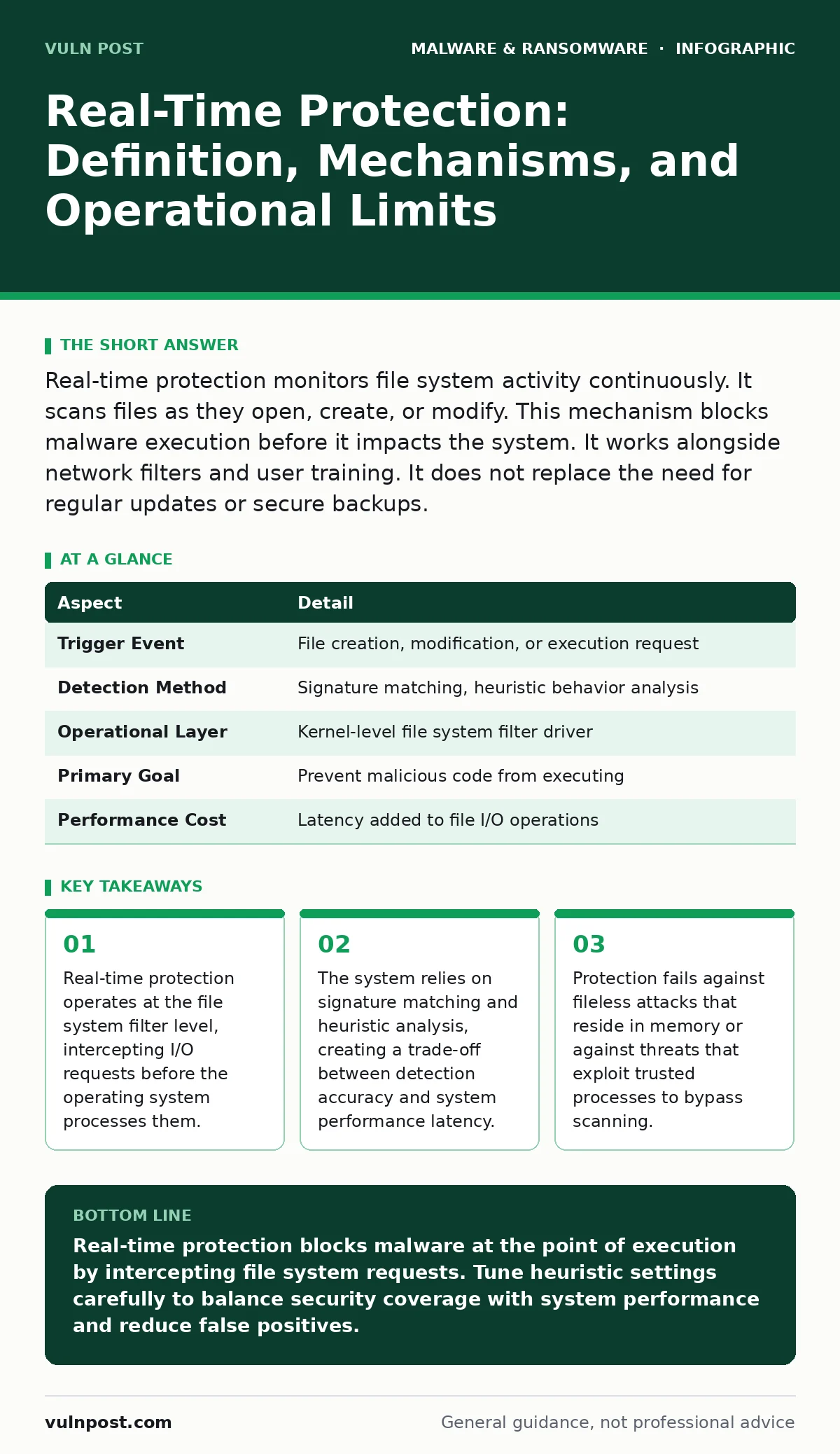
Real-time protection monitors file system activity continuously. It scans files as they open, create, or modify. This mechanism blocks malware execution before it impacts the system. It works alongside network filters and user training. It does not replace the need for regular updates or secure backups.
The File System Gatekeeper Analogy
Imagine a security checkpoint at an airport. Standard antivirus software acts like a baggage scanner that checks luggage after it has already arrived on the conveyor belt. Real-time protection acts like the metal detector at the door. It stops the item from entering the secure area before it can cause harm. This distinction matters because timing determines whether a threat executes or remains dormant.
The checkpoint does not judge the traveler. It judges the object passing through the sensor. If the object matches a known dangerous shape, the alarm triggers. If the object is new but behaves suspiciously, the inspector flags it for manual review. This immediate intervention prevents the threat from establishing a foothold.
| Aspect | Detail |
|---|---|
| Trigger Event | File creation, modification, or execution request |
| Detection Method | Signature matching, heuristic behavior analysis |
| Operational Layer | Kernel-level file system filter driver |
| Primary Goal | Prevent malicious code from executing |
| Performance Cost | Latency added to file I/O operations |
Defining Real-Time Protection
Real-time protection is a security mechanism that monitors file system activity as it happens. It does not wait for a scheduled scan to run. Instead, it hooks into the operating system’s input/output manager. Every time an application tries to read, write, or execute a file, the protection engine intercepts that request.
The engine analyzes the file content and the context of the request. If the analysis detects malicious patterns, the engine blocks the operation. The user often sees no indication of this process. The file simply fails to open or save. This silent blocking is the primary value proposition. It stops threats before they can modify system settings or exfiltrate data.
The Problem It Solves
Malware relies on execution to cause damage. A virus sitting on a hard drive is inert. It becomes dangerous only when the operating system loads it into memory. Real-time protection solves the execution gap. It closes the window between a file landing on the disk and it running.
Without this layer, an attacker can drop a payload onto a system and wait. The user might not run it immediately. They might leave it for days. A scheduled scan might miss it if the schedule is infrequent. Real-time protection ensures that the moment the user or an automated script attempts to run the file, the security software evaluates it. This reduces the dwell time of threats to near zero.
Core Components and Mechanisms
The system relies on three main components. First, the file system filter driver sits between the application and the disk. It captures every file operation. Second, the scanning engine analyzes the captured data. It uses signatures for known threats and heuristics for unknown ones. Third, the response module decides the action. It can block, quarantine, or allow the file.
Heuristic analysis looks for behavior rather than specific code. It checks if a file tries to modify critical system directories. It checks if a file tries to hide its presence. This allows the system to catch new malware that lacks a known signature. However, heuristics are prone to false positives. Legitimate software that behaves aggressively might get blocked.
Integration with Other Defenses
Real-time protection does not work in isolation. It fits into a layered defense strategy. It complements network-level controls that block malicious traffic before it reaches the endpoint. It works with immutable backups to ensure that if a file slips through, the organization can restore clean data without paying ransoms.
It also relates to software restriction policies. While real-time protection scans for malicious content, restriction policies control which applications are allowed to run. Combining both creates a strong barrier. The restriction policy limits the attack surface. The real-time protection catches anything that bypasses the policy. This dual approach reduces reliance on signature updates.
See also: Golden Images Best Practices for Secure Endpoint Deployment · Next-Generation Antivirus: Definition, Mechanics, and Operational Limits
Common Misconceptions and Limits
Users often believe real-time protection stops all malware. This is incorrect. It cannot stop attacks that do not involve file system writes. Fileless malware lives in memory. It uses legitimate tools like PowerShell or WMI to execute commands. Since no malicious file is written to the disk, the file system filter never sees it.
Another misconception is that it provides perfect accuracy. Heuristic engines generate false positives. Legitimate files get blocked. This causes operational friction. Security teams must spend time investigating and whitelisting false alarms. This hidden cost reduces the efficiency of the security operation.
Performance Trade-Offs
Scanning every file operation adds latency. The system must pause the file operation while the engine analyzes it. On high-performance servers, this can slow down transaction processing. On personal computers, it can cause slight stuttering during heavy file transfers.
Organizations must tune the protection settings. They can exclude certain directories from scanning. This speeds up performance but reduces security. The trade-off requires careful balancing. Security teams must identify which directories are safe to exclude. They must ensure that excluded areas do not become staging grounds for malware.
Operational Best Practices
To maximize effectiveness, keep the signature databases updated. New threats emerge constantly. Old signatures become useless. Automation ensures that updates apply without manual intervention. This maintains the detection capability against known threats.
Regularly review quarantine logs. Blocked files provide insight into attack trends. Analyze why certain files were blocked. Determine if they were true positives or false alarms. This feedback loop improves the tuning of heuristic rules. It reduces noise and focuses the security team’s attention on genuine threats.
Key takeaways
- Real-time protection operates at the file system filter level, intercepting I/O requests before the operating system processes them.
- The system relies on signature matching and heuristic analysis, creating a trade-off between detection accuracy and system performance latency.
- Protection fails against fileless attacks that reside in memory or against threats that exploit trusted processes to bypass scanning.
Real-time protection blocks malware at the point of execution by intercepting file system requests. Tune heuristic settings carefully to balance security coverage with system performance and reduce false positives.
Frequently asked questions
Does real-time protection stop ransomware?
It can block ransomware execution if the malicious file is scanned before running. It cannot stop ransomware that exploits vulnerabilities in running applications or uses fileless techniques.
How does it differ from scheduled scans?
Real-time protection monitors activity continuously as files are accessed. Scheduled scans check the entire disk at set intervals. Real-time protection catches threats immediately, while scheduled scans catch dormant threats.
Can real-time protection be bypassed?
Yes. Attackers can use techniques like process hollowing or memory injection to bypass file system checks. They can also exploit zero-day vulnerabilities in the security software itself.
Does it slow down my computer?
It adds slight latency to file operations. The impact depends on the hardware and the tuning of the security software. Proper configuration minimizes performance degradation.
How this guide was produced: written by the Vuln Post editorial team with AI assistance, checked against the public references listed below, and reviewed when the facts change. See our editorial policy or report an error.