
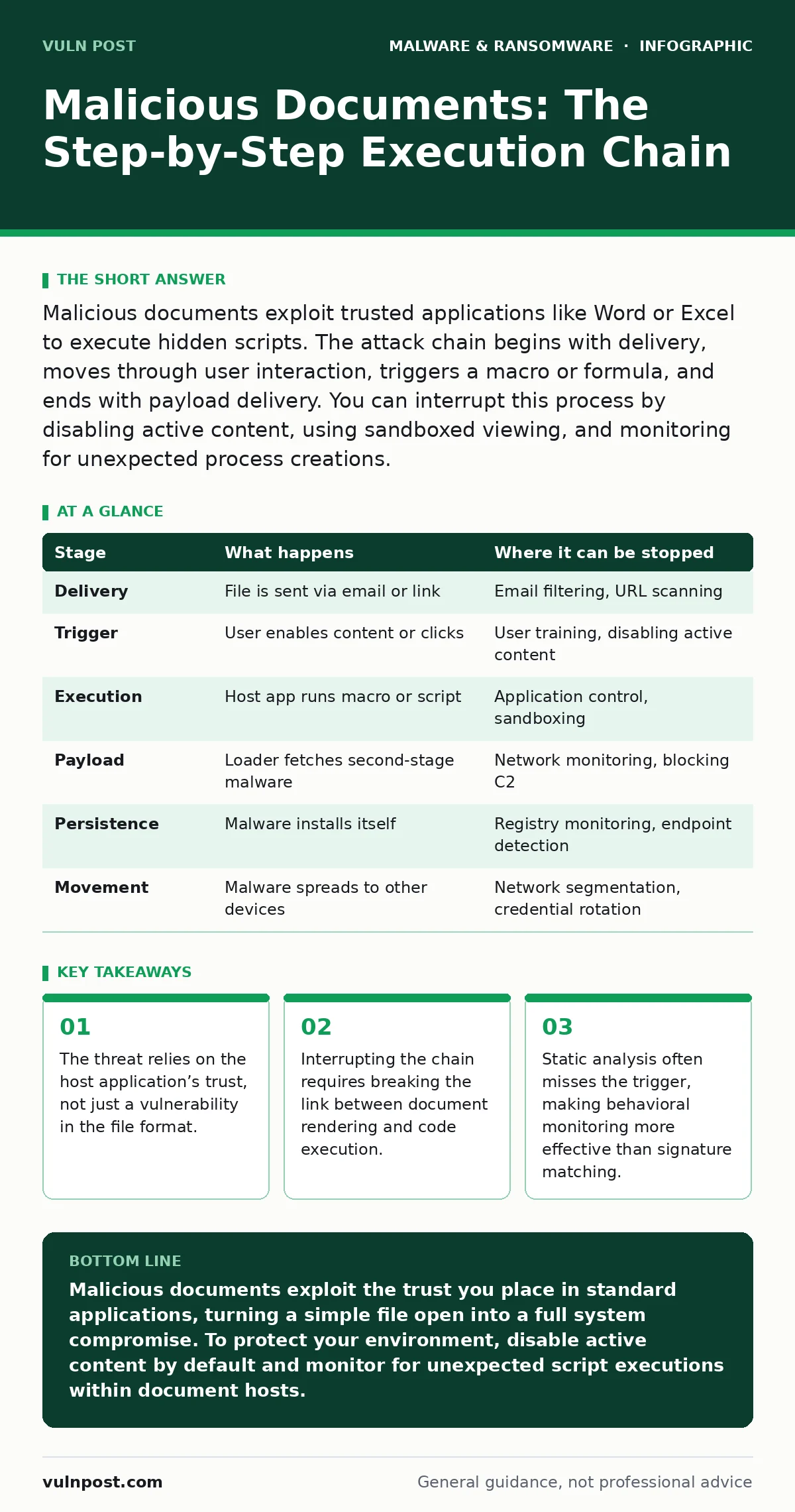
Malicious documents exploit trusted applications like Word or Excel to execute hidden scripts. The attack chain begins with delivery, moves through user interaction, triggers a macro or formula, and ends with payload delivery. You can interrupt this process by disabling active content, using sandboxed viewing, and monitoring for unexpected process creations.
The Delivery Vector
The attack begins long before the file opens. You receive a document that appears legitimate, often mimicking an invoice, a resume, or a shipping notification. The file itself is usually a standard format, such as a PDF or an Office document. This familiarity lowers your guard. The attacker relies on social engineering to ensure you interact with the file. However, the technical payload is embedded within the document’s metadata or hidden objects.
The file is often compressed or password-protected to evade initial scanning. Some attackers use legitimate cloud storage links to host the file, bypassing email gateways. The goal at this stage is simple: get the file onto your local disk. If you download the file to a temporary folder, it may execute automatically if your system is configured to allow it. This is why understanding your download behavior is part of the defense.
The User Interaction Trigger
A malicious document does not execute code automatically upon download. It requires a trigger. This is the most critical point of failure for the attacker. You must perform an action that the application interprets as permission to run active content. In modern Office applications, this often involves clicking a button that says "Enable Content" or "Allow Data."
Suppose you open a PDF that asks you to "click to view." That click is the trigger. The application then loads the embedded script. The attacker relies on your habit of enabling content to view the document properly. Many users assume that enabling content is necessary to see the text or images. This assumption is the flaw the attacker exploits. The document looks broken or incomplete until you grant permission.
The Execution Environment
Once triggered, the document leverages the host application to run code. This is where the concept of the execution environment matters. The code runs within the context of the Word or Excel process. It inherits the permissions of that process. If you opened the file as a standard user, the malware has standard user permissions. If you opened it as an administrator, it has administrative privileges.
This stage often involves a macro. A macro is a series of instructions that automates tasks within the application. In a malicious document, the macro does not automate a task; it executes a command. The command might download a second-stage payload from a remote server. It might execute a script that lives in the document’s XML structure. The host application acts as the bridge between the static file and the living malware.
The Payload Delivery
The first stage rarely contains the full malware. It is a loader. Its only job is to fetch the actual payload. This separation allows the attacker to update the malware without changing the document. The loader might use PowerShell, a built-in scripting tool on Windows, to download a file from the internet. It might use certutil, a standard Windows utility, to retrieve data.
The payload is often encrypted or obfuscated to avoid detection. It might be split into multiple parts that are reassembled in memory. This technique is known as fileless malware. Because the payload never touches the disk as a standalone file, traditional antivirus software may not see it. The loader executes the code in the computer’s RAM. This makes detection difficult because there is no file to scan.
The Persistence Mechanism
Once the payload is in memory, the malware seeks persistence. It wants to survive a reboot. It might modify the Windows Registry to start itself when the system boots. It might create a scheduled task that runs at specific intervals. It might replace a legitimate system file with a malicious version.
This stage is silent. You will not see a new icon on your desktop. You will not hear a new sound. The malware integrates itself into the operating system. It relies on the fact that most users do not check their startup items or scheduled tasks. The attacker knows that you are likely to close the document and continue working. The malware waits in the background, ready to activate when it detects a target or a command.
See also: Trojan vs Virus: Which Malware Type Fits Your Threat Model · Why Malware Families Matter for Incident Response and Detection
The Lateral Movement
With persistence established, the malware looks for more value. It scans the local network for other devices. It looks for shared folders, databases, and servers. It might steal credentials from your browser or password manager. These credentials allow it to move to other computers. This is lateral movement.
The malware uses the stolen credentials to log into other systems. It repeats the process of establishing persistence and seeking more data. It might encrypt files on a server for ransom. It might exfiltrate sensitive documents to an external server. The scope of the attack expands from a single document to the entire network. The initial document was just the key to the door.
Interrupting the Chain
You can stop this process at multiple points. The most effective interruption is at the user interaction stage. If you never enable content, the macro never runs. This requires a cultural shift in how you handle documents. You must assume that any document from an unknown source is malicious.
Technical controls can also help. Disabling macros for all documents except those in a trusted location is a strong defense. Using a sandboxed environment to open suspicious documents prevents the malware from affecting your main system. Monitoring for unexpected process creations, such as PowerShell launching from Word, can alert you to an attack in progress.
| Stage | What happens | Where it can be stopped |
|---|---|---|
| Delivery | File is sent via email or link | Email filtering, URL scanning |
| Trigger | User enables content or clicks | User training, disabling active content |
| Execution | Host app runs macro or script | Application control, sandboxing |
| Payload | Loader fetches second-stage malware | Network monitoring, blocking C2 |
| Persistence | Malware installs itself | Registry monitoring, endpoint detection |
| Movement | Malware spreads to other devices | Network segmentation, credential rotation |
The Hidden Cost of Convenience
The root cause of these attacks is the convenience of modern applications. You want to open a document and see it immediately. You want to interact with charts and forms. These features require active content. The attacker exploits this desire for functionality. Every feature that allows a document to do more than display text is a potential attack vector.
You must weigh the convenience against the risk. Disabling all active content breaks some legitimate workflows. You may need to enable macros for certain trusted internal documents. This creates a trade-off. You must have a clear policy for what is trusted and what is not. Without this policy, you are guessing. Guessing is how attacks succeed.
Key takeaways
- The threat relies on the host application’s trust, not just a vulnerability in the file format.
- Interrupting the chain requires breaking the link between document rendering and code execution.
- Static analysis often misses the trigger, making behavioral monitoring more effective than signature matching.
Malicious documents exploit the trust you place in standard applications, turning a simple file open into a full system compromise. To protect your environment, disable active content by default and monitor for unexpected script executions within document hosts.
Frequently asked questions
Can a PDF file contain malware?
Yes, PDF files can contain JavaScript or embedded objects that execute code when the file is opened or when a user interacts with a specific element.
How do I know if a document has a macro?
Most modern office applications display a yellow warning bar at the top of the window if the document contains active content or macros.
Is disabling macros enough to stop all document attacks?
No, some attacks exploit vulnerabilities in the rendering engine itself, allowing code execution without macros. Other attacks use formula-based exploits in spreadsheets.
Why can't antivirus software stop these attacks?
Antivirus software relies on known signatures. If the malware is new, obfuscated, or fileless, it may not match any known pattern, allowing it to bypass detection.
How this guide was produced: written by the Vuln Post editorial team with AI assistance, checked against the public references listed below, and reviewed when the facts change. See our editorial policy or report an error.